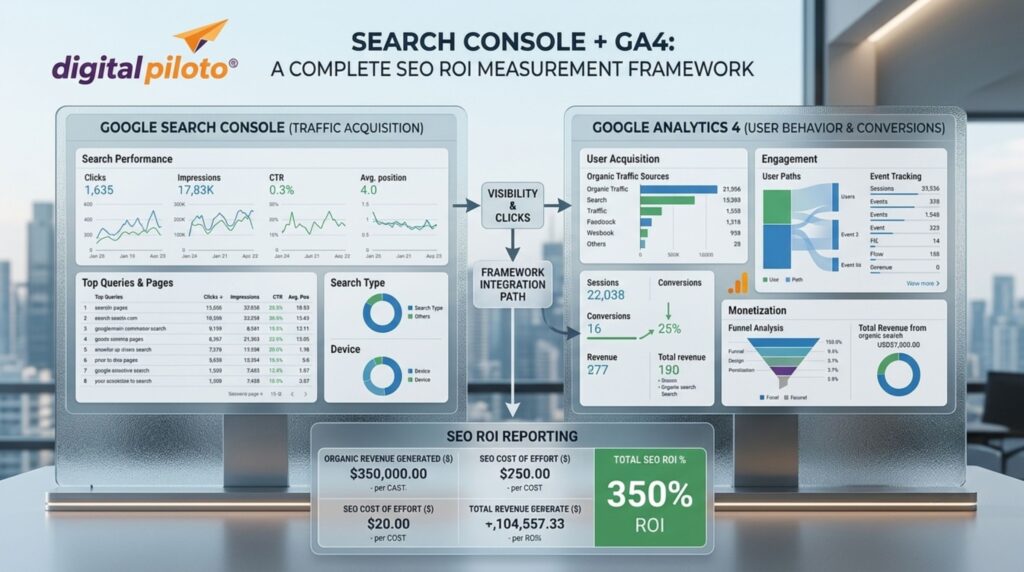

SEO reporting often stops at rankings, clicks, and traffic. But traffic is not revenue, and a position number rarely explains whether marketing investment is paying off. A stronger framework connects Google Search Console with GA4, linking search visibility to engagement, leads, conversions, revenue, and business outcomes.
For companies investing in SEO services India, this distinction matters. Search Console tells you what is happening before the visitor arrives; GA4 helps explain what happens after the click. Together, they create a much clearer picture of SEO performance.
Why SEO ROI Is Harder Than It Looks
There is an uncomfortable truth about SEO dashboards: they can look impressive while the business underneath is struggling.
A website may gain 80% more impressions, move hundreds of keywords onto page one, and attract thousands of additional visitors. Yet if those visitors are researching rather than buying, the increase may have little commercial value.
The opposite can also happen. A page may generate modest traffic but consistently attract people searching for high-intent services. If even a small percentage become qualified leads, that page could be far more valuable than a high-traffic informational article.
That is why SEO ROI should be treated as a chain rather than a single metric:
- Visibility: Did Google show the content?
- Acquisition: Did searchers click through?
- Engagement: Did visitors meaningfully interact?
- Conversion: Did they complete an important action?
- Business value: Did those actions generate revenue or qualified opportunities?
Once you think about SEO this way, Search Console and GA4 stop being two separate reporting tools. They become two halves of the same measurement system.
What Search Console Tells You
Google Search Console is strongest at measuring search visibility and the behavior that happens directly within Google Search.
Its Performance report includes impressions, clicks, click-through rate, and average position, along with dimensions such as queries, pages, countries, and devices. Google defines CTR as clicks divided by impressions.
That makes Search Console particularly useful for answering questions such as:
- Which search queries are creating visibility?
- Which pages receive the most organic clicks?
- Where are impressions increasing without corresponding clicks?
- Which pages have strong rankings but weak CTR?
- Which non-branded searches are expanding?
- Which devices, countries, or search categories are producing opportunities?
One important nuance is often missed: average position is not a simple “rank tracker” number. Google explains that it represents the average topmost position of a site’s result across impressions, so it should be interpreted as a trend rather than treated as an exact ranking for every search.
Google also recommends paying attention to impressions and clicks rather than relying on position alone when evaluating search performance.
What GA4 Adds to the Picture
Search Console can tell you that someone clicked a search result. GA4 can help you understand what happened after that visitor landed on the website.
GA4’s Traffic acquisition report provides dimensions for understanding where users and sessions originated, while metrics include engagement rate, engaged sessions, key events, session key event rate, and revenue where applicable.
This changes the conversation from “How much organic traffic did we get?” to more useful questions:
- Which organic landing pages generate meaningful engagement?
- Which pages assist visitors before they convert?
- Which organic sessions trigger valuable business events?
- Which content attracts users who later return through another channel?
- How much revenue is associated with organic customer journeys?
For ecommerce, the connection can become especially direct because purchase and revenue data can be measured within GA4 when ecommerce tracking is correctly implemented. For lead-generation businesses, the framework needs to go one step further and connect online leads with qualification and eventual sales.
Step One: Define What “ROI” Means
Before opening a report, define the business outcome.
This sounds obvious, but many SEO programs begin with metrics already available in the tools rather than metrics the company actually cares about.
A B2B company might define SEO success as qualified opportunities. An ecommerce brand may focus on profitable purchases. A local service business could care about phone calls, appointment requests, or quote submissions.
GA4 calls important business actions key events. Google describes a key event as an event that measures an action particularly important to the success of a business.
Start by identifying a small group of meaningful actions rather than marking every interaction as a conversion.
A practical hierarchy
- Primary outcomes: purchases, qualified leads, booked consultations, completed applications, or closed opportunities.
- Secondary outcomes: form starts, product views, pricing-page visits, demo requests, or high-value downloads.
- Engagement signals: engaged sessions, important page views, scroll behavior, or repeat visits.
The hierarchy prevents a common reporting mistake: treating every click as equally valuable.
Step Two: Build a Reliable GA4 Conversion Layer
Your ROI framework is only as good as its tracking.
If a form submission is not recorded, GA4 cannot report it. If a purchase event is missing revenue or currency information, revenue analysis becomes unreliable. If lead quality exists only inside a CRM, the website analytics platform may stop seeing the journey before the real business outcome occurs.
Google recommends events such as generate_lead, qualify_lead, working_lead, and close_convert_lead for businesses that need to measure lead generation through offline outcomes.
That is a useful concept for SEO teams because a form submission is not necessarily a customer.
Imagine 100 organic leads arrive in a month. Twenty-five are relevant. Ten enter serious discussions. Four become customers. If your SEO dashboard celebrates all 100 as equally successful, it is measuring activity rather than ROI.
Step Three: Connect Search Console With GA4
The two platforms answer different questions, so resist the temptation to force them into identical reporting.
Search Console is query- and search-performance focused. GA4 is user-behavior and outcome focused. The useful analysis happens when you compare the stories they tell.
For example, suppose Search Console shows that a service page receives:
- Strong impressions.
- Above-average CTR.
- Increasing clicks.
- Commercial search queries.
That sounds positive. But if GA4 shows weak engagement and almost no key events from that landing page, the SEO opportunity is incomplete.
Perhaps the search result promises something the landing page does not deliver. Perhaps the CTA is unclear. Maybe the page is too generic. Or perhaps the traffic is informational despite appearing commercially relevant.
The answer is not automatically “do more SEO.” Sometimes the best SEO improvement happens after the click.
Step Four: Create an SEO ROI Funnel
A useful dashboard should follow the visitor’s journey instead of presenting a pile of disconnected numbers.
Stage 1: Search visibility
Use Search Console to monitor impressions, queries, pages, CTR, country, device, and position trends.
This tells you whether your content is becoming more discoverable and whether the search terms align with the market you want.
Stage 2: Organic acquisition
Move into GA4 and examine organic sessions, landing pages, engagement rate, and new versus returning users.
Now you can see whether the visibility is producing visitors who actually interact with the website.
Stage 3: Key events
Measure the business actions that matter. Google Analytics allows key-event reporting across acquisition reports and other analyses, including the ability to examine which traffic sources generated those actions.
Stage 4: Revenue and qualified pipeline
This is where SEO reporting becomes genuinely useful to leadership.
For ecommerce, connect organic traffic with transaction value and revenue. For B2B, connect lead generation with CRM stages and eventual deal value. For service businesses, assign sensible estimated values to qualified actions where direct revenue attribution is difficult.
Do Not Confuse Attribution With Causation
This is one of the most important parts of an SEO ROI framework.
A customer may discover your company through Google, return directly several days later, read a case study, receive an email, and then speak with sales before purchasing. Which channel deserves the credit?
There is no universally perfect answer.
GA4 provides attribution models that distribute credit across touchpoints. Google currently supports data-driven attribution as well as last-click approaches for relevant reporting contexts.
Data-driven attribution uses observed path data and machine-learning methods to estimate how touchpoints contribute to key events.
So if organic search receives 40% of the attributed value of a customer journey, that does not mean SEO single-handedly created 40% of the sale. It means the selected attribution methodology assigns that portion of credit to organic search.
That distinction makes reporting more honest—and usually more useful.
Where Generative Search Fits Into SEO ROI
Search behavior is changing quickly. A visitor may encounter your brand through a conventional result, an AI-generated answer, a branded query, or an AI-assisted research journey before ever reaching your website.
This makes traditional click-only reporting less complete.
A generative engine optimization agency may focus on improving a brand’s visibility across AI-generated search experiences, but the measurement challenge remains: not every discovery produces a measurable website session.
That does not make the activity impossible to evaluate. It means the measurement framework should include a wider set of signals, such as branded search growth, qualified organic traffic, direct traffic patterns, assisted conversions, referral sources, mentions, and customer-reported discovery.
Google’s guidance for AI search also continues to emphasize foundational SEO practices, useful content, crawlability, and content that genuinely satisfies users.
In practical terms, SEO measurement is becoming less about asking, “Did we rank?” and more about asking, “Did our visibility create meaningful business movement?”
Calculate SEO ROI Without Overcomplicating It
Once reliable revenue or value data is available, you can calculate a straightforward return estimate.
SEO ROI = (SEO-attributed revenue − SEO investment) ÷ SEO investment × 100
For example, imagine a business invests ₹2,00,000 in SEO over a defined period and attributes ₹7,00,000 in revenue to organic search under its chosen methodology.
The calculation would be:
(₹7,00,000 − ₹2,00,000) ÷ ₹2,00,000 × 100 = 250%
That number is useful only if the underlying attribution and cost assumptions are credible. Do not hide uncertainty behind a very precise percentage.
For longer B2B sales cycles, it may be better to report several layers:
- Organic traffic and qualified sessions.
- Organic leads and qualified leads.
- Organic-influenced opportunities.
- Closed revenue influenced by organic search.
- SEO investment and estimated return.
This gives executives a more realistic view of how search contributes to growth.
Build a Monthly SEO ROI Review
A good reporting system should not require an analyst to explain every number from scratch each month.
Create a repeatable review that compares the current period with a meaningful previous period. Look for movement rather than isolated highs and lows.
Google’s Search Console reporting supports comparisons, filters, query analysis, page analysis, and segmentation by dimensions such as device and country.
Each month, ask five practical questions:
- Where did organic visibility grow or decline?
- Which pages gained or lost qualified search traffic?
- Which landing pages generated meaningful key events?
- Did organic leads become better or worse in quality?
- What should we change next month based on the evidence?
The fifth question is crucial. Reporting without a decision attached to it is just documentation.
Common SEO ROI Measurement Mistakes
Even sophisticated teams can fall into a few predictable traps.
- Using rankings as the primary KPI: Rankings are directional indicators, not business outcomes.
- Counting every form submission as a qualified lead: Lead quality must eventually enter the measurement model.
- Comparing Search Console and GA4 numbers directly: The platforms use different methodologies and measurement scopes.
- Ignoring assisted journeys: Organic search may influence users who eventually convert through another channel.
- Changing attribution models without documenting it: A reporting-model change can alter how historical performance is interpreted.
For businesses that want a broader growth system, working with the best digital marketing company India can also help connect SEO reporting with paid media, conversion optimization, content, and broader acquisition data.
Frequently Asked Questions
Can Search Console measure SEO revenue?
Search Console primarily measures search performance such as impressions, clicks, CTR, queries, pages, and position. It does not function as a complete revenue analytics platform. Revenue and downstream business outcomes generally need to be measured through GA4, ecommerce systems, CRM data, or other business systems.
Why are Search Console clicks different from GA4 organic sessions?
The platforms measure different things and use different methodologies. Search Console reports clicks from Google Search, while GA4 reports website sessions based on analytics measurement. Differences are therefore normal and should not automatically be treated as tracking errors.
Which GA4 metrics matter most for SEO?
For ROI-focused SEO, prioritize meaningful outcomes such as key events, qualified leads, purchases, revenue, and conversion rates. Engagement metrics are useful for diagnosis, but they should support business metrics rather than replace them.
What is the best attribution model for SEO?
There is no universally perfect model. Data-driven attribution can help distribute credit across relevant touchpoints based on available data, while last-click reporting provides a simpler view. The important thing is to choose a consistent methodology and explain its limitations.
Final Thoughts
SEO becomes much easier to defend when the reporting moves beyond rankings. Search Console shows whether your website is earning visibility and clicks; GA4 shows what visitors do afterward. When those insights are connected to qualified leads, customers, and revenue, SEO stops looking like a traffic exercise and starts looking like what it should be—a measurable growth channel.
The goal is not to make every organic visit carry a price tag. It is to understand which search investments create meaningful movement, where the funnel leaks, and what your team should improve next.
Blog Development Credits
This article was conceptualized by Amlan Maiti, developed with AI-assisted research, and refined through final SEO enhancements by Digital Piloto Private Limited.